What is the direct answer?
TL;DR: AI receptionist software is only useful when it moves a caller towards a reliable next step. Before buying, decide how calls enter the system, which information the receptionist may use, where captured details go, when a booking can be changed, how a person takes over and what happens if any connection fails. Test that complete path with realistic calls, not a polished voice demo alone.
Definition: AI receptionist software integrations are the connections that let a voice receptionist receive calls, use approved business information, check or update another system, pass structured details to staff and preserve a safe human fallback when an automated step cannot finish.
Buyers often start with a feature list: voice quality, languages, booking, transfers and reports. The harder question is whether those features fit the way the business already works. A conversation that sounds natural but leaves no usable record still creates manual cleanup. A booking connection that cannot explain its limits may create confusion. A transfer without context makes the caller repeat everything.
Quotable takeaway: The best integration is not the one with the longest feature list; it is the one that turns a call into a clear next action without hiding failure.
Which AI receptionist integrations matter most?
Start with outcomes rather than software names. Map each common call to one destination and one accountable person. Most local service businesses should examine six connection areas:
- Phone entry: how an existing number, a dedicated line or a forwarding rule sends the right calls to the receptionist.
- Approved information: where opening hours, service boundaries, locations and caller-facing answers come from.
- Booking or scheduling: whether the receptionist may only collect a request, read availability or complete a permitted booking action.
- Customer or job records: where contact details, intent, notes and the call outcome are stored.
- Human handoff: who receives a live transfer, callback request or urgent notification, and with what context.
- Review and reporting: where staff can inspect outcomes, spot errors and improve the workflow.
Not every business needs all six on day one. The right set is the smallest one that completes a useful call safely and leaves staff with a clear task.
Should an integration create a record or complete an action?
This distinction changes both value and risk. A record-only connection sends a structured message or creates a lead for a person to review. An action connection can reserve a slot, update a customer record, route a call or trigger another workflow. Buyers should ask exactly which verbs the system is permitted to perform.
A sensible progression is to start with notification, then add structured record creation, and only then enable selected two-way actions. For example, a team may begin by receiving a complete appointment request. Once it trusts the intake fields and exception rules, it can consider allowing defined bookings. This sequence is not a universal requirement; it is a practical way to make each added permission observable.
Write the expected result for every branch in plain language. If the caller wants a new appointment, where is the request stored? If the caller wants to reschedule, is that action allowed? If the caller asks for advice outside the approved information, which person receives the request? A provider should be able to demonstrate each answer.
Keep your number: choose when calls are forwarded
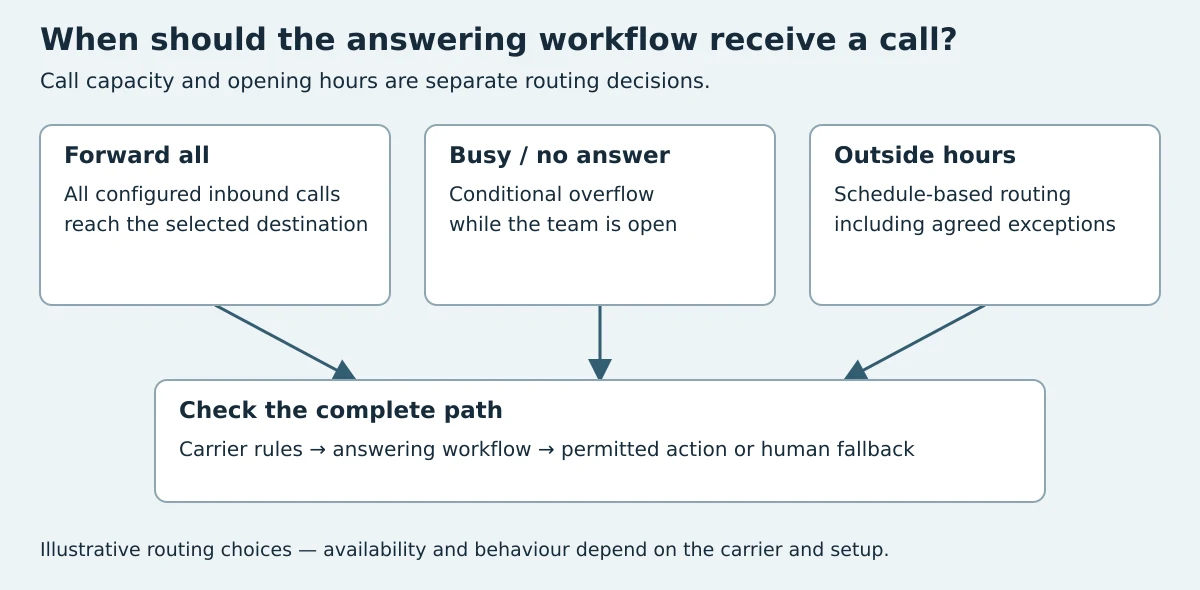
Keeping an advertised number and changing where calls are answered are separate decisions. A supported forwarding arrangement may let callers continue using the same business number without porting that number. Confirm the precise options with the current carrier and the receiving service.
| Routing choice | When the answering workflow receives a call | Questions to settle before enabling it |
|---|---|---|
| Forward all calls | Calls are directed to the configured destination | Can staff still receive permitted transfers, and how is forwarding disabled? |
| Forward when busy | The carrier or phone system detects a busy line | Does call waiting change that behaviour, and what happens during simultaneous calls? |
| Forward on no answer | The call is not answered within the configured interval | Which timer applies, and will existing voicemail answer first? |
| Out-of-hours route | The phone system applies an opening-hours schedule | Which timezone, holidays and exceptional closures apply? |
Overflow is about capacity while the team is open; after-hours is about the schedule. They are not interchangeable, and conditional forwarding is not a promise that every carrier supports the same options. Test caller identification, voicemail, any carrier charges and the destination's failure path. Avoid a forwarding loop in which the receptionist transfers back to a number that forwards straight to it again.
For examples of distinct forwarding arrangements, Ruby explains manual, remote and delayed forwarding, while Smith.ai describes external-number and conditional forwarding. Their instructions are provider-specific; do not copy a dial code across carriers or countries. VoiceFleet's existing country pages contain setup sections for Ireland, the UK, Canada and New Zealand. Confirm the applicable carrier instructions before use.
How should an existing phone setup connect?
The phone connection is the front door. Ask whether the proposed setup uses a dedicated number, conditional forwarding, a full-time forwarding rule or another supported arrangement. Then confirm what happens during open hours, outside open hours, when a person is already on a call and when a transfer is not answered.
Do not assume that connecting a number automatically preserves every existing behaviour. Check caller identification, transfer destinations, voicemail, recording settings, call menus and any numbers used for different locations or departments. Product and carrier capabilities vary, so the provider should confirm the exact path for the business before launch.
Run one diagram from the caller to the final owner of the task. If the diagram has an undefined branch, the setup is not ready. The related AI phone answering service failover guide offers a deeper checklist for calls that cannot follow the preferred route.
What should a calendar or booking connection be allowed to do?
Booking is valuable only when the receptionist understands the same constraints as the team. Before enabling an action, define the services that may be booked, their duration, which staff or resources are eligible, required lead time, unavailable periods and the information that must be collected first.
Separate four intents: a new booking, a change, a cancellation and a general availability question. They may need different permissions. A business might allow new requests but keep cancellations or unusual changes with a person. The receptionist should never imply that a slot is confirmed unless the approved workflow has actually confirmed it.
Also decide what the caller hears when availability cannot be checked. A truthful fallback could collect preferred times and promise a human follow-up without claiming a reservation. That response protects trust and keeps the enquiry moving.
Check the exact calendar connection and its permissions
VoiceFleet already has dedicated pages for Google Calendar, Microsoft 365 and Outlook, Calendly and Cal.com. Use those existing pages as starting points, then verify the actions your account may perform.
| Evidence level | What it establishes | What it does not establish |
|---|---|---|
| Product or provider documentation | The described connection, requirements and intended actions | That your credentials, selected calendar or business rules are configured correctly |
| Availability response | Slots or busy periods were returned for a particular request | That an appointment was created |
| Successful creation response | The permitted system reports that a record was created | That every downstream practice system, notification or cancellation workflow completed |
| Record readback and staff check | The expected record can be found with the correct time, status and details | Guaranteed future availability, attendance or business results |
Google's event-creation API and Open Dental's Appointments API illustrate why booking actions and their required fields must be checked against the actual destination. These are provider documents, not evidence that VoiceFleet supports every operation or an Open Dental integration. A general calendar booking and a practice-management appointment are not automatically equivalent.
Ask which calendar is selected, which permissions were granted, how the timezone is handled, which appointment types are allowed and what happens when the connection expires or a slot is no longer available. Keep capture, availability lookup, creation, rescheduling, cancellation and notification as separate items in the acceptance checklist.
Use the existing demo-testing guide to record the result. Until the relevant action is demonstrated, label it untested and retain a monitored request-and-callback path. This section provides a decision framework; no new live integration or voice benchmark was performed for this update.
What should a customer-record handoff contain?
The handoff should help the next person act without replaying the whole call. Useful fields commonly include the caller's name, contact method, stated intent, relevant service or location, preferred timing, important constraints, the outcome already agreed and the person or queue responsible for follow-up.
Keep the summary factual. Distinguish what the caller said from any label the workflow applies. Avoid asking for information that the team does not need for the next step. If a field is essential, test callers who answer indirectly, change their mind or spell details unclearly.
A connection can write to a customer relationship system, job platform, shared inbox or another approved destination. The format matters more than the label: staff need consistent fields, a visible outcome and no ambiguity about ownership. See the AI receptionist CRM handoff guide for a focused record design.
When is a native integration better than an API or lightweight handoff?
There is no single best connection method. Choose the least complex method that can complete the required outcome and be supported reliably.
| Connection approach | Best fit | What to verify |
|---|---|---|
| Native provider connection | A supported system and a common, well-defined workflow | Exact actions, field mapping, permissions, error visibility and support ownership |
| API-based connection | A custom workflow or system with suitable technical access | Authentication, allowed actions, maintenance owner, testing and failure response |
| Workflow connector | A straightforward transfer between common tools | Trigger conditions, duplicate handling, field loss, delay and who monitors failures |
| Structured email or shared inbox | A simple first launch where a person completes the next action | Consistent format, delivery, task ownership and response process |
Ask who owns the connection after launch. If a field changes or an external system is unavailable, does the provider, the business or another technology partner investigate? Clear ownership is part of the product decision.
What should happen when a connection fails?
Failure behaviour should be designed before automation is enabled. The receptionist should not invent availability, pretend a record was saved or tell a caller that a transfer succeeded when it did not. It should preserve the details already captured, explain the next step simply and route the unresolved task to a monitored destination.
Test failures deliberately: make the calendar unavailable, leave a transfer unanswered, provide incomplete contact details and repeat the same request. Check whether staff can see what failed and whether the caller receives an honest response. A silent failure is more damaging than a limited workflow that clearly asks a person to follow up.
How should buyers test integrations during a demo?
Ask the provider to demonstrate the outcome in the receiving system, not just the phone conversation. Use a small set of calls that expose the seams:
- A normal new enquiry that should create a complete record.
- A caller who changes the requested service midway through the call.
- A booking request that fits the standard rules.
- A request that falls outside the allowed booking rules.
- A transfer that nobody answers.
- A temporary calendar or destination failure.
- A repeat caller whose details may already exist.
After each call, inspect the destination. Was the record created once? Are the important fields correct? Is the outcome explicit? Can a staff member tell what to do next? These checks reveal more than a generic promise that a platform integrates with a tool.
For market context, buyers can compare how Dialzara describes cloud phone service and how Ruby presents answering services. These are different operating categories, so compare the actual call path, actions and ownership rather than relying on category labels.
How can a small team avoid over-integrating?
Choose one valuable call type and one destination first. Write the successful outcome, the human fallback and the fields staff truly need. A service business might start with new enquiries that become structured callback tasks, while keeping complex changes with a person. Once that path is consistent, add another outcome.
More connections create more dependencies. That does not make integration undesirable; it makes scope important. Remove fields nobody uses, avoid duplicate alerts and keep one clear owner for each task. Review the workflow when services, staff responsibilities or connected systems change. The AI receptionist requirements guide can help define those boundaries before configuration.
Where does VoiceFleet fit?
VoiceFleet is an AI receptionist platform for local service businesses. It answers calls, captures intent, routes enquiries according to the configured call path. Its role is to turn a phone conversation into an appropriate next step while keeping human handling available where the workflow requires it.
Every business uses a different mix of phone, scheduling and customer systems. Integration availability and the actions a connection can perform should therefore be confirmed for the specific setup. In a VoiceFleet demo, bring the current call path, the systems staff use and two or three real call outcomes you want to improve. Review VoiceFleet pricing alongside the setup and support required, rather than comparing a headline feature in isolation.
What should you decide before speaking to a provider?
- Which calls should the AI receptionist answer first?
- What is the one useful outcome for each call type?
- Which system is the source of approved caller-facing information?
- Which actions may be automated and which require a person?
- Where should a record, alert or booking appear?
- Who owns each follow-up and each connection?
- What should the caller hear when an action cannot finish?
If those answers are clear, a provider can show whether the proposed connections fit. If they are vague, even capable AI receptionist software may produce a workflow the team cannot trust.
What do buyers ask about AI receptionist software integrations?
Does AI receptionist software need a CRM integration?
No. A CRM connection can be useful, but the first requirement is a reliable destination that staff actually monitor. A structured shared inbox or another approved record can be a valid starting point when it gives the team consistent details and clear ownership.
Can an AI receptionist use an existing business phone number?
It may be possible through a supported forwarding or phone configuration, but the exact options depend on the provider, carrier and current setup. Confirm open-hours routing, unanswered transfers, caller identification and fallback behaviour before changing a live number.
Can AI receptionist software book appointments directly?
Some configurations can perform defined booking actions when availability, service rules and permissions are available. Buyers should verify which actions are supported and require a truthful request-and-callback path whenever a booking cannot be confirmed.
Is a native integration always better?
No. A native connection can simplify a common workflow, while an API may suit a custom process and a structured handoff may be safer for a simple first launch. Judge the method by the outcome, visibility, ownership and failure behaviour.
What if the calendar or customer system is unavailable?
The receptionist should preserve the details it has, avoid claiming that an action succeeded and send the unresolved task to a monitored human path. Buyers should test this scenario before launch rather than assuming it will work.
Which integration should a business set up first?
Start with the connection that completes the most valuable, repeatable call outcome with the least unnecessary complexity. For many teams, that means creating a structured new-enquiry record and a clear follow-up task before enabling broader automated actions.
How do you evaluate your own call workflow?
Bring one real call path to a VoiceFleet demo and map the phone entry, approved information, destination, owner and fallback from beginning to end. Then compare the required configuration with pricing before choosing the right scope.
Changelog
- 3 October 2026: added conditional-forwarding and overflow choices, links to the existing calendar-specific source pages, a booking-evidence checklist and an illustrative routing diagram. These are evaluation guides, not new product-test results. Original URL retained.


