Reviewed 2 October 2026 by the VoiceFleet Team.
The best way to test an AI receptionist is to run the same realistic calls with every provider and inspect what happened after each call. Test a normal booking, a vague enquiry, an after-hours call, a caller who changes their mind, a complaint, a pricing question and an urgent call that should be escalated. Judge the system on the saved outcome and staff handoff, not only on voice quality.
Try the checklist now
Open the VoiceFleet demo and choose a workflow close to your business. Download the editable CSV scorecard to record the same 12 scenarios for each provider.
For every call, write down the expected outcome, actual summary or test booking, and any failed handoff. A promised action only passes when its result is visible. Use invented caller details and an isolated calendar. Do not enter real customer or patient information during testing.
Need a workflow configured first? Book an optional setup discussion. Check the supported integrations before testing booking or calendar changes.
What should an AI receptionist demo prove?
A useful demo shows that the system can understand caller intent, collect the required details, follow approved rules, hand off sensitive calls and give staff a usable next action. A natural voice is helpful, but it is not enough. If the assistant sounds friendly while missing the callback number or promising an action that never happened, the workflow failed.
Keep four results separate:
- Answered call: the assistant picked up and spoke with the caller.
- Captured request: the system recorded a message or preferred appointment.
- Saved action: the correct booking, task or CRM record exists in the connected test system.
- Delivered confirmation: the caller or staff received the agreed confirmation through a verified channel.
The booking evidence chain
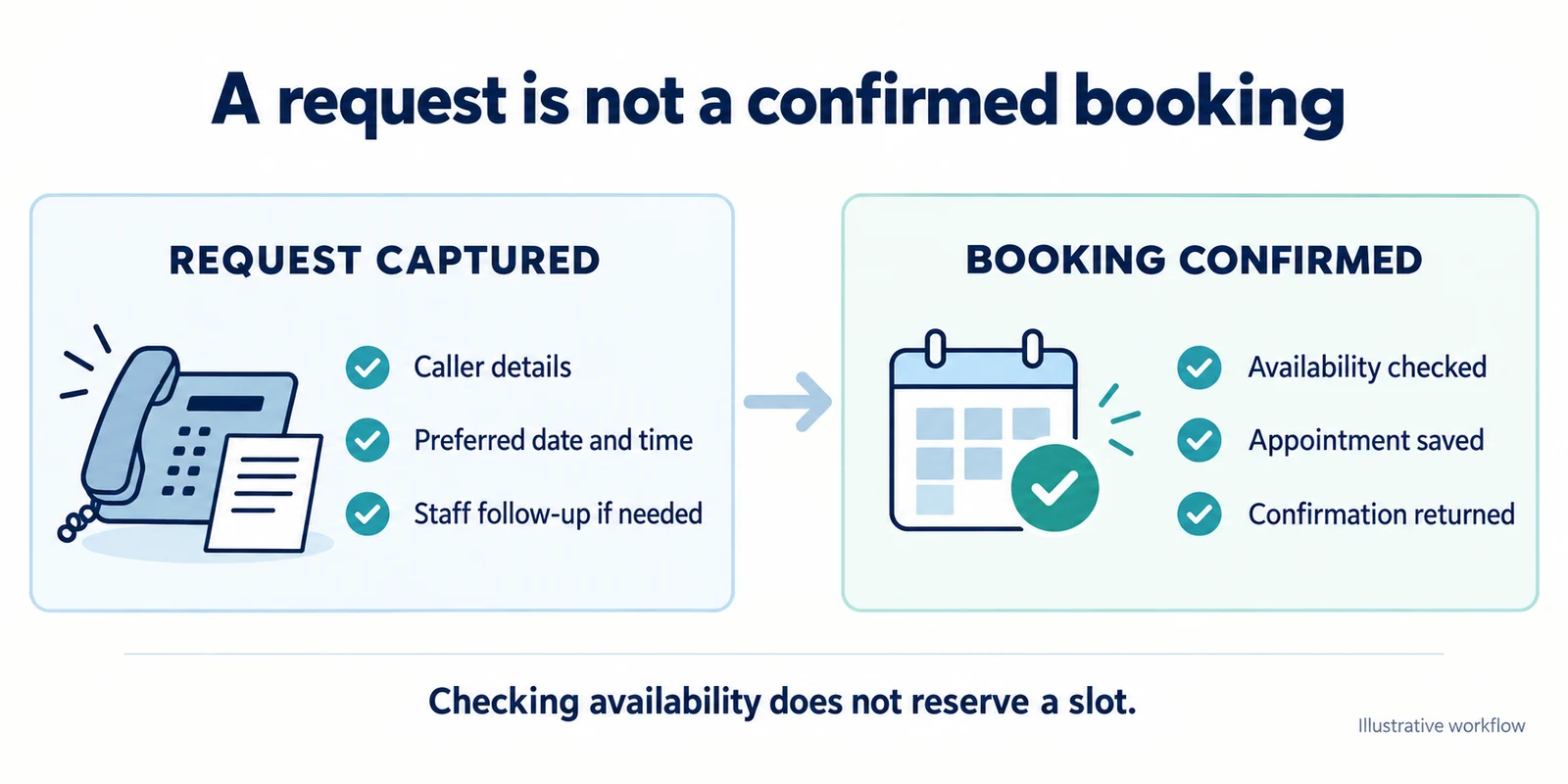
Google documents availability lookup and event creation as separate operations. The practical implication is that an available slot is not a saved appointment. The illustration is a buyer checklist, not proof that VoiceFleet or another provider executes every depicted step in every integration.
What VoiceFleet's local fixture showed—and did not show
VoiceFleet reran six code-level scenarios against isolated sample-calendar modules on 2 October 2026. All six completed in that fixture. The result is useful for checking local logic, but it is not evidence of live speech recognition, a production calendar write or notification delivery.
The fixture also accepted an unnamed “Guest” and did not enforce a phone number or email address. Buyers should therefore include missing and corrected contact details in their own acceptance tests. The run did not test live voice, language handling, deposits, cancellations, human handoff, time-zone conversion or consumer outcomes.
The 12 demo scenarios to run before choosing a provider
- Simple new enquiry. Call as a new customer who wants help but is not sure what to ask for. The assistant should guide the caller without a rigid phone tree.
- Appointment or booking request. Ask for a specific time, then change it mid-call. Inspect the final result and make sure no duplicate was created.
- After-hours caller. Ask what happens next. The assistant should explain the next step without pretending staff are immediately available.
- Quote request. Ask for pricing. The assistant should collect useful context and avoid inventing an unapproved price.
- Urgent or sensitive issue. Use a scenario that should be escalated rather than answered automatically.
- Caller changes their mind. Switch requests midway through the call and inspect the final summary.
- Missing and corrected contact details. Omit a required field, then correct one digit in the callback number. Check what the workflow saves.
- Noisy or interrupted call. Pause, correct yourself or ask the assistant to repeat information.
- Complaint. Act like a frustrated customer. The assistant should stay calm and avoid unsupported promises.
- Existing-customer update. Ask about a previous job, appointment or message. Confirm what the connected system can actually retrieve.
- Integration handoff. Inspect the task, summary, calendar, CRM, email or SMS output that staff receive.
- Human handoff request. Ask to speak to a person during and outside staffed hours. Test the fallback when no one answers.
AI receptionist demo scorecard
Mark every scenario pass, fail or not tested. Keep the output that supports the decision. Do not average away a missing booking, wrong identity or unsafe escalation because the greeting sounded good.
| What to score | What good looks like | Red flag |
|---|---|---|
| Intent detection | The assistant follows the caller's final request | It locks onto the first keyword and ignores corrections |
| Required details | It captures only the fields the business needs and validates required ones | It ends with missing contact details or saves conflicting values |
| Rule following | It follows approved booking, pricing and escalation rules | It invents policy, advice, availability or an outcome |
| Saved result | The expected task or appointment exists exactly once | The call sounds successful but there is no usable record |
| Staff handoff | The summary makes the next action obvious | Staff must replay the full recording to know what happened |
| Failure behaviour | The caller hears an accurate fallback | The assistant confirms an action whose status is unknown |
Questions to ask every provider
- Can we test our own call scenarios before launch?
- Which calls can the service capture, book, route, summarise or escalate today?
- Which fields are required, and what happens when one is missing or corrected?
- How are after-hours calls handled differently from staffed hours?
- Can we set strict rules for pricing, refunds, complaints, emergencies and sensitive topics?
- Which exact calendar, CRM, email, SMS or practice-system actions are supported?
- How do we identify a failed, uncertain or duplicate action?
- What does the caller hear when the assistant cannot confidently help?
- How quickly can a human take over, and what happens when the transfer is unanswered?
When is AI a better fit than a human answering service?
An AI receptionist can fit repeatable call types, defined intake fields and predictable routing rules. A human service can fit calls requiring judgement, negotiation, emotional nuance or regulated advice. Many businesses use a hybrid approach: automation for first response and structured intake, with people making the decisions that require discretion.
Demo red flags
- The provider only showcases perfect scripted calls.
- Required fields and failure paths are not demonstrated.
- The staff summary is vague or missing the promised next step.
- The assistant makes unapproved claims about pricing, availability or policy.
- A booking, message or transfer is counted as successful without checking the destination system.
- Product limitations are explained only after the trial.
Frequently asked questions
What is the most useful demo test?
Test a caller who changes their mind or corrects a required detail. Clean handling of imperfect calls is more informative than a polished script.
Should I test after-hours calls?
Yes. The assistant should state availability accurately, capture enough information for staff to act and escalate only according to approved rules.
How do I compare providers fairly?
Use the same scenarios, test data and expected outcomes. Score the saved result, required fields, rule following, caller experience and handoff.
Can an AI receptionist replace every human task?
No. It can support repeatable answering, intake, routing, booking and summaries when configured and tested. Sensitive or judgement-heavy calls need a human path.
Final recommendation
Run the 12 scenarios and inspect the saved outputs before changing production phone routing. If the assistant captures the required details, follows your rules, records the intended action and fails safely, consider a limited pilot. If it only sounds natural, keep testing.
Try the scenarios in the live demo, compare plans and included minutes, or discuss your setup.
Changelog
- 2 October 2026: added saved-action and confirmation stages, required-field and failure-path checks, bounded local fixture evidence and an appointment evidence diagram. The existing URL, title and original publication date were retained.


