An AI receptionist can say an appointment is booked without giving a salon owner the evidence needed to rely on it. Before putting a phone assistant in charge of bookings, check what changed in the diary—not just how natural the conversation sounded.
When comparing an AI receptionist for salons in Ireland, the useful question is: can the supplier show the appointment record, the right service and staff member, and what happens when a step fails? A captured request, an available slot and a confirmed appointment are different outcomes.
This guide is a buyer's acceptance checklist, not a survey of Irish salons or a claim that a particular supplier has failed. It combines primary-source documentation with a narrowly scoped VoiceFleet sample-calendar check. No customer calls or customer results are used.
What does booked actually mean?
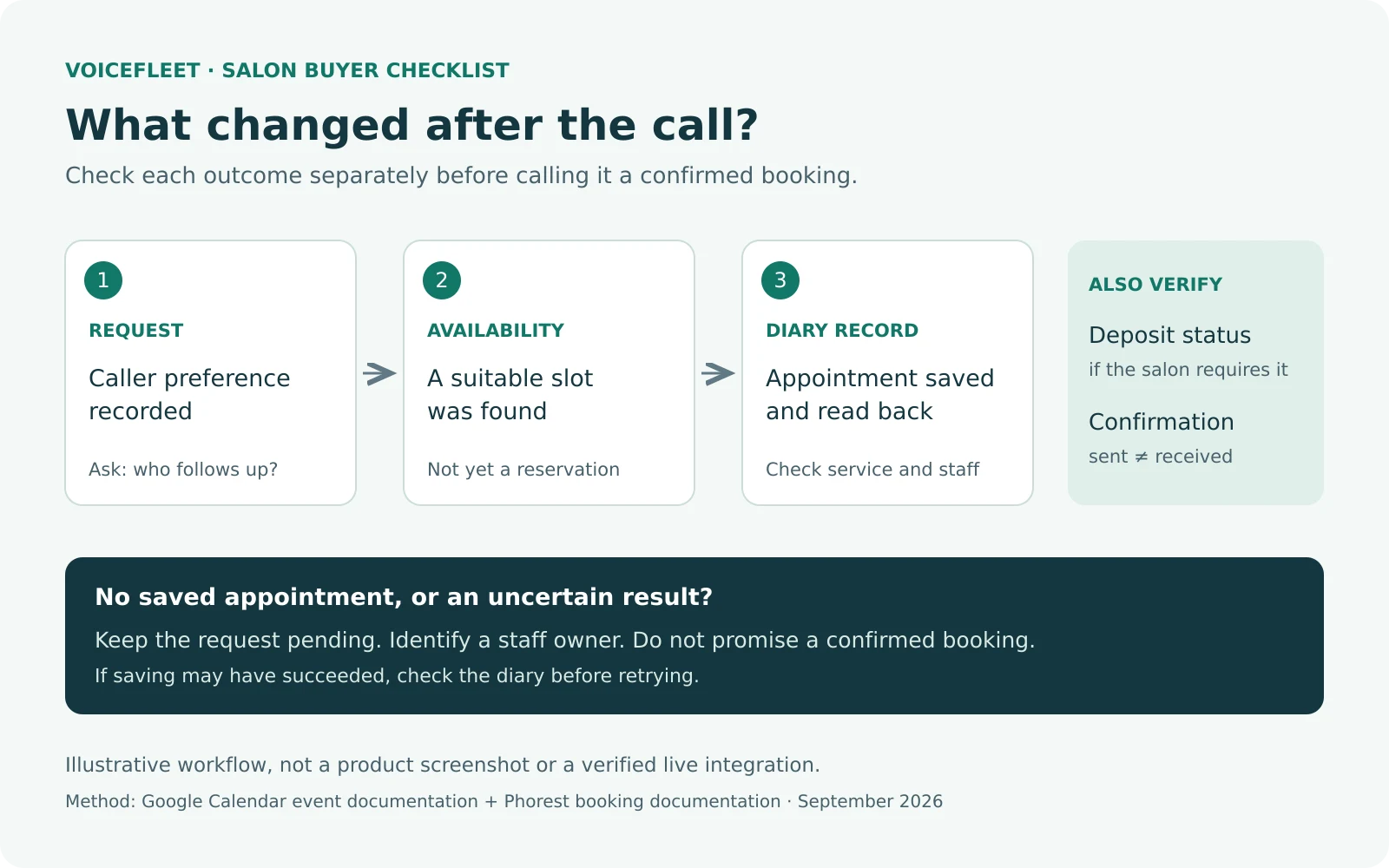
Think of the process as separate pieces of evidence:
- Request captured: the caller's preferred service and time have been recorded for staff. There may be no reserved slot.
- Availability checked: the system has found an opening. That alone does not create an appointment.
- Appointment saved: the intended booking system contains a record with the correct details. Read it back from that system rather than relying only on the assistant's spoken response.
- Customer informed: a confirmation has reached its intended destination. This is a separate check from saving the appointment.
If a deposit is required, check its status separately too. A booking record is not evidence that a payment succeeded. The salon must decide when an appointment can be described as confirmed under its own booking policy.
Why the distinction matters
Google Calendar's event-creation documentation treats inserting an event and notifying attendees as distinct operations. Creating an event requires write access to the calendar; notification behaviour is controlled separately through sendUpdates. Google also documents using a chosen event ID to help avoid duplicate creation when a request fails after the event has already been created.
That does not establish a VoiceFleet integration. It illustrates a general purchasing question: if the assistant loses its connection just after saving, can it check what happened before trying again?
Phorest's online-booking documentation describes deposit settings and options for clients to edit and rebook appointments. Those are additional workflow decisions beyond finding a free time. Do not assume a phone assistant has access to those capabilities simply because the salon uses Phorest.
Taken together, these sources suggest a better demonstration: follow one request through the diary, any required payment step and the confirmation channel. Ask the supplier to show the boundaries of the proposed setup, including steps that still need staff.
A salon demonstration script you can reuse
Use an isolated test calendar or an agreed test environment. Do not create real appointments, charges or messages to customers while experimenting.
Try this fictional test request, replacing the details with services your salon actually offers:
Could I book a cut and blow-dry next Tuesday after work? I usually see a particular stylist, but I can be flexible.
Before the assistant confirms anything, check that it resolves the actual date, a precise time, service duration, staff availability and the correct location. For an Irish booking, make the intended local time explicit. A pleasant conversation is not evidence that those fields are right.
Then use these acceptance checks. They are recommended tests to run with your supplier, not claimed VoiceFleet live-test results.
Download the printable acceptance worksheet (PDF) or editable checklist (CSV). Both are free and require no sign-up.
| Test request or condition | Evidence to ask for | If the evidence is missing |
|---|---|---|
| Ask what times are available, then decline | No appointment created merely by checking availability | Investigate before enabling booking |
| Choose an available service and time | A saved diary record with matching service, date, duration and staff | Describe it as a request, not a confirmed booking |
| Request an unavailable stylist or time | No conflicting reservation; an accurate alternative or staff handover | Do not invent availability |
| Change your mind before confirmation | The final choice read back accurately; no unwanted extra appointment | Ask staff to resolve the uncertainty |
| Disconnect during the save step | A check for an existing record before any retry | Avoid repeatedly creating appointments |
| Require a deposit | The relevant payment status and the salon's rule for confirmation | Keep the payment or booking status explicitly pending |
| Provide a contact address and request confirmation | Correct destination plus delivery evidence where available | Do not claim that a message arrived |
| Booking system unavailable | A clear request-for-callback record and an identified staff owner | Tell the caller the booking is not yet confirmed |
A confirmation number produced by a demonstration is useful only within that demonstration. Ask where the real record lives and who can retrieve it.
What our sample check did—and did not—prove
On 25 September 2026, VoiceFleet checked local sample-calendar code using synthetic inputs. An availability lookup left the sample booking list empty. Creating an available appointment produced a readable sample record; a second attempt at the same slot was rejected.
The check also exposed a limitation: that sample accepted a booking without enforcing a customer's phone number or email address. It demonstrates why an appointment record alone cannot establish that a customer can receive a confirmation.
These were local code checks with external services replaced by test fixtures. They were not calls through the current AssistantFleet service, a live salon-calendar integration, a payment test or a message-delivery test. They do not establish speech accuracy, deposit handling or live booking reliability. No real appointments or external emails were created.
What to ask before choosing an AI receptionist
Ask for a written description of the proposed mode: request capture, staff-assisted booking, or a demonstrated connection to your actual diary. Include the fallback when that connection is unavailable and a named owner for pending requests.
If you are evaluating VoiceFleet, request a salon-focused demonstration and identify the booking system you use. The useful next step is to establish what can be demonstrated for that specific setup—not to assume every salon platform is supported.
Keep the completed checklist. Mark each item as demonstrated, not demonstrated or not applicable, with the date and evidence. That gives you something more useful than a smooth sales call: a clear agreement about what the system will do and when a person must take over.
Sources and method
Primary sources: Google Calendar: create events and Phorest: online booking, reviewed 28 September 2026. Provider documentation describes those providers' capabilities, not a verified VoiceFleet connection. The workflow and acceptance checks are VoiceFleet Team's original analysis. The limited local observation above is dated separately and is not a customer case study.
Updated 28 September 2026: replaced the earlier general call-flow guide with a diary-verification checklist, an explanatory diagram and explicit test limitations. The article's URL is unchanged.