Direct answer: an AI receptionist should handle predictable, repeatable phone calls — booking, intake, routing, FAQs, order capture, rescheduling, and after-hours lead capture — but it should hand off to a human whenever the caller is upset, the request is legally or medically sensitive, the information is ambiguous, payment or account authority is unclear, or the call could create real operational risk.
Last reviewed: 3 October 2026.
The best AI receptionist is not the one that refuses to escalate. It is the one that knows exactly when to keep going, when to pause, and when to bring a person into the conversation.
That distinction matters for small businesses. If your phone system only answers basic questions, it misses valuable calls. If it tries to automate everything, it can create trust problems. The right design is a controlled handoff model: AI first for speed and coverage, human backup for judgment.
This guide explains how to design that handoff layer.
What is an AI receptionist human handoff?
An AI receptionist human handoff is the rule-based moment when an AI phone agent transfers, messages, schedules a callback with, or alerts a real team member because the call needs human judgment.
A handoff is not a failure. In a well-designed AI answering service, it is part of the workflow. The AI receptionist should collect the caller's name, contact details, intent, urgency, and relevant context before escalating. That way, the person who receives the handoff is not starting from zero.
A simple handoff flow looks like this:
- Caller explains the reason for calling.
- AI receptionist identifies the intent: booking, support, sales, emergency, complaint, billing, or unknown.
- AI handles the call if the path is safe and predefined.
- AI escalates when the call crosses a risk threshold.
- Human receives the call, message, transcript, or callback task with context.
The goal is not to replace every front-desk decision. The goal is to stop simple calls from blocking the team while making sure important calls still reach the right person.
When should an AI receptionist hand off to a human?
Use explicit escalation rules. Do not rely on vague instructions like "transfer if needed". A production-ready AI receptionist should hand off when one of these triggers appears.
1. The caller is angry, distressed, or losing trust
Tone matters. A caller who says "I need to speak to someone now", repeats the same request, complains about a previous mistake, or sounds distressed should not be trapped in automation.
The AI can still be useful here. It should acknowledge the issue, capture the reason for the call, and route it with urgency. But the resolution belongs with a person.
Good handoff instruction:
If the caller is angry, repeatedly asks for a person, says the issue is urgent, or rejects the AI's help twice, stop the automated path and offer a transfer or callback.
2. The request is urgent or safety-sensitive
Some calls should never be handled as normal admin. This includes emergencies, safeguarding concerns, severe pain, threats, accidents, clinical symptoms, legal deadlines, or any scenario where a wrong answer could harm the caller.
For these calls, the AI receptionist should not improvise. It should follow a narrow safety script, avoid diagnosis or legal advice, and route to the emergency instruction chosen by the business.
The qualified business team should define urgent-call wording and destinations before launch. Do not use this general handoff guide as a clinical triage protocol, an emergency-response service or legal advice.
3. The caller needs a decision the AI is not authorised to make
An AI receptionist can collect information. It should not make policy exceptions unless those rules are explicitly approved.
Escalate when the caller asks for:
- A refund, discount, or fee waiver.
- A clinical, legal, or financial judgment.
- A change to a contract, quote, or payment plan.
- Access to private account information.
- A promise about availability that the system cannot verify.
The AI can say: "I can take the details and ask the team to come back to you." That is safer than guessing.
4. The caller does not fit a known call path
Your AI receptionist should have mapped paths for common calls: new booking, reschedule, cancel, pricing question, opening hours, location, existing customer, sales inquiry, and after-hours urgent routing.
If the call does not match a known path, escalate. Unknown calls are where bad automation creates bad experiences.
A useful rule is:
If the AI cannot confidently classify the call after two clarifying questions, collect contact details and hand off.
5. The caller asks for a named person
This one is simple. If a caller asks for a specific clinician, manager, solicitor, owner, technician, or salesperson, the AI should not pretend to be a gatekeeper.
It can ask whether the call is urgent, capture a message, and route it according to the team's preference. But it should respect named-person requests.
6. The booking depends on complex context
AI appointment booking works well when availability, service type, duration, and required details are clear. It should escalate when the appointment depends on nuance.
Examples:
- A dental patient is unsure whether they need a check-up, emergency slot, or treatment review.
- A salon client wants a colour correction but cannot describe the current hair history clearly.
- A restaurant booking involves accessibility, allergy, private dining, or deposit questions outside the normal policy.
- A trades customer has an issue that may be emergency, insurance, warranty, or landlord-related.
The AI can still gather the facts. The handoff should include those facts so the human callback is faster.
Warm transfer, cold transfer and a message are not the same
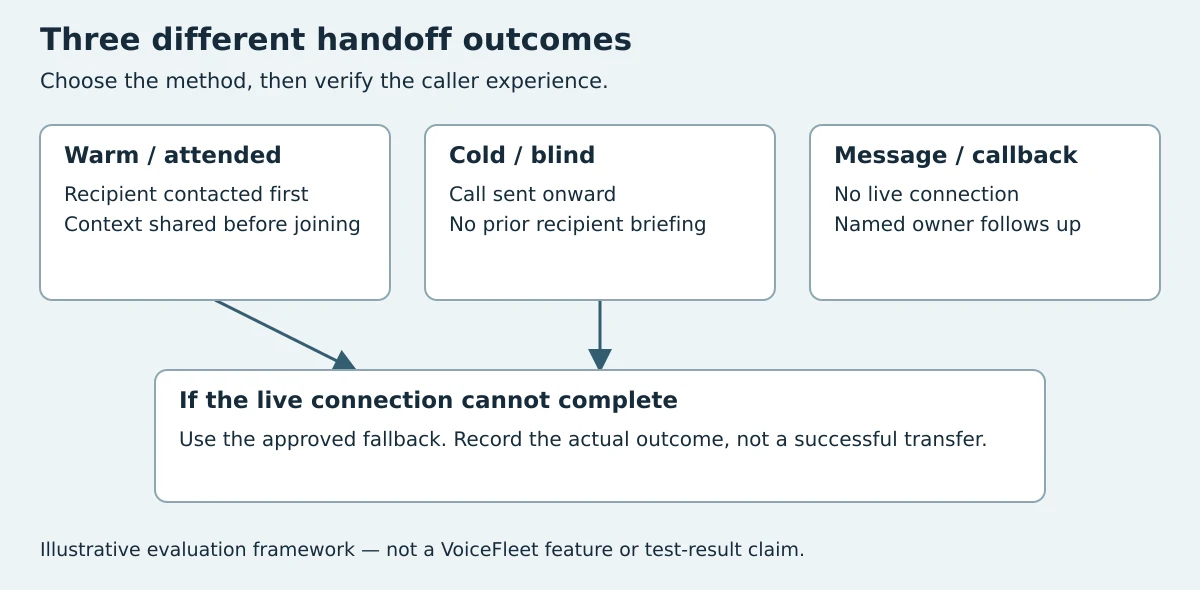
Providers use “handoff” for different actions. Ask them to show which one is configured, rather than treating the label as a feature guarantee.
| Method | What happens before the caller reaches staff | What to verify |
|---|---|---|
| Warm or attended transfer | The recipient is contacted and given context before the caller is connected | Whether the recipient can accept or decline, what context is shared, and what the caller hears while waiting |
| Cold or blind transfer | The call is sent onward without that prior conversation with the recipient | What happens if the destination is busy, rings unanswered or reaches voicemail |
| Structured message or callback request | Details are sent for later follow-up; no live connection is established | That the message arrived, a person owns it and no unapproved callback time was promised |
This distinction is based on Ruby's description of warm transferring and Synthflow's warm-versus-cold transfer guide. They describe their categories and services; they do not verify VoiceFleet's implementation. Terminology varies: Synthflow also uses “warm” for a live transfer accompanied by a system message or metadata. Here, attended means the recipient is contacted before connection. A callback message with no live connection is still not a completed transfer. Confirm the actual sequence, not just the label.
Test the unsuccessful transfer, not just the successful one
Before enabling a live route, agree a staffed destination, an allowed wait, the caller-facing wording and a fallback owner. Test a busy recipient, no answer, a declined call and an after-hours request. Confirm whether the caller returns to the answering workflow, reaches voicemail, can leave a message or receives another approved instruction. The result depends on the phone platform and configuration.
For a synthetic test, record the requested route, whether anyone actually answered, the final caller experience and the delivered follow-up record. Mark an attempt unanswered or message captured when appropriate; do not call it a successful transfer merely because another phone rang.
VoiceFleet's exact transfer method and failure behaviour must be confirmed for the customer's configuration. This guide is an evaluation method, not a claim that warm transfer, recipient briefing or every fallback has been tested or is supported in every account. Book a walkthrough with the destination and scenario you need to verify.
Five types of human handoff
Handoff does not always mean a live transfer. The right model depends on business hours, staffing, urgency, and call type.
1. Live transfer
A configured live transfer attempts to connect the caller to a staffed destination. Confirm the method and use it only for the call types and availability rules the business has approved.
Possible uses: complaints, named-person requests and complex sales conversations during staffed hours. Urgent cases follow a separately approved escalation process.
Watch out for: transferring to a phone that nobody answers. If the transfer fails, the AI needs a fallback path.
2. Structured message handoff
The AI collects the details and sends a structured message to the team: caller name, phone number, reason, urgency, summary, and requested next step.
Best for: after-hours calls, non-urgent support, sales leads, rescheduling questions.
Watch out for: vague messages. "Caller wants help" is useless. The handoff should read like a mini intake note.
3. Scheduled callback
The AI offers a callback window and creates a task for the team. This is often better than leaving a voicemail because the caller knows what happens next.
Best for: businesses that cannot answer live all day but still want predictable follow-up.
Watch out for: over-promising. Only offer callback windows the team can actually meet.
4. Department or role routing
The AI routes based on intent: new booking, billing, support, emergency, sales, owner, front desk, or technical team.
Best for: multi-location businesses or teams with different call owners.
Watch out for: too many branches. If the routing menu becomes complicated, callers feel like they are back in a bad IVR.
5. Human review after the call
The AI completes the call but flags it for review because it involved uncertainty, high value, or a possible issue.
Best for: quality assurance, training, sales follow-up, sensitive admin.
Watch out for: review queues nobody checks. A review flag only matters if someone owns it.
How to write good AI receptionist escalation rules
Good handoff rules are specific. They tell the AI what to listen for, what to say, what information to collect, who receives the escalation, and what happens if the first path fails.
Use this structure.
Trigger
Define the moment that causes escalation.
Examples:
- Caller asks for a human twice.
- Caller matches a qualified team-approved urgent-call rule.
- Caller requests a refund.
- Caller is an existing customer with an unresolved complaint.
- Caller wants a same-day appointment but no suitable slot is available.
AI response
Write the exact tone. Keep it short and reassuring.
Example:
I can help get this to the right person. Before I do, can I take your name and the best number to reach you on?
Required information
List the fields the AI must collect before handoff.
For most calls:
- Name.
- Phone number.
- Reason for call.
- Urgency.
- Existing customer or new enquiry.
- Preferred callback time if relevant.
For bookings:
- Service requested.
- Preferred date or time.
- Location if there are multiple branches.
- Any constraints the business needs to know.
Destination
Name the owner, not just the channel. "Send to the team" is too vague.
Better:
- Emergency dental calls → duty phone.
- New restaurant group enquiries → sales inbox and owner SMS.
- Existing customer billing → admin inbox.
- Trades emergency → on-call technician.
Fallback
Always decide what happens if the transfer fails.
Example:
If live transfer fails, apologise, confirm the caller's number, mark the message urgent, and send the summary to the on-call contact.
Example handoff matrix
| Call type | AI handles? | Human handoff? | Suggested action |
|---|---|---|---|
| Opening hours or location | Yes | Usually no | Answer directly and offer booking help |
| New appointment request | Yes | Sometimes | Book if rules are clear; escalate if the service or urgency is unclear |
| Reschedule or cancellation | If supported | Sometimes | Complete only with supported integration actions and approved policy; escalate exceptions |
| Pricing question | Yes | Sometimes | Explain approved pricing ranges or route to sales; do not invent discounts |
| Complaint | Partly | Yes | Acknowledge, collect details, route to owner/manager |
| Emergency | No | Yes | Follow safety script and route immediately |
| Named-person request | Partly | Yes | Capture message and route to the named person or agreed backup |
| Complex clinical/legal/financial question | No | Yes | Do not advise; collect details and escalate |
| Sales enquiry | Yes | Sometimes | Qualify and book demo; escalate high-value or custom requests |
This matrix should be customised before launch. The important part is ownership: every escalated call should have a destination and a fallback.
What the AI should say during handoff
The handoff moment should be calm and transparent. Do not make the caller feel blocked.
Good wording:
I want to make sure this is handled properly, so I’ll get the right person involved. I’ll take a few details first so they have the context.
For after-hours calls:
The team is not available live right now, but I can take the details and make sure this is sent to the right person for follow-up.
For urgent calls where the business has a defined urgent path:
This sounds urgent. I’m going to follow the urgent-call process now and get this routed as quickly as possible.
Avoid wording like:
- "I cannot help with that."
- "Please call back later."
- "That is outside my scope."
- "I am just an AI."
The caller does not care about the system boundary. They care about what happens next.
What information should be included in the handoff note?
A strong handoff note should make the next human action obvious.
Use this format:
- Caller: name and phone number.
- Status: new lead, existing customer, patient/client, supplier, other.
- Intent: booking, support, complaint, emergency, sales, billing, named-person request.
- Summary: one or two sentences in plain English.
- Urgency: normal, same day, urgent, emergency path used.
- Requested action: call back, confirm appointment, review issue, send quote, transfer to owner.
- Transcript or recording link: if available and compliant with your policies.
The best test is simple: could someone read the note and call back confidently in under one minute? If not, the handoff is too weak.
Common mistakes to avoid
Mistake 1: Treating handoff as an edge case
Handoff is not rare. It is part of real call handling. Build it into the main design from day one.
Mistake 2: Transferring too quickly
A bad transfer wastes the caller's time. Let the AI collect the basics first unless the call is urgent.
Mistake 3: Transferring too late
If the caller is frustrated or the request is sensitive, stop pushing automation. A quick handoff protects trust.
Mistake 4: No owner for escalations
If five people receive the same message, nobody owns it. Assign handoff destinations clearly.
Mistake 5: Letting the AI make unsupported claims
The AI should not invent prices, promise availability, give legal advice, diagnose symptoms, guarantee outcomes, or claim a staff member will call at a time the team has not approved.
Mistake 6: No after-hours fallback
After-hours AI answering is valuable only if the captured call turns into a real next step. Make sure urgent messages, sales leads, and appointment requests land somewhere the team actually checks.
How VoiceFleet approaches human handoff
VoiceFleet is built around practical call handling, not all-or-nothing automation. VoiceFleet supports configured inbound reception workflows. Booking actions, transfer methods and failure behaviour depend on the connected systems and approved rules; confirm and test the exact setup before enabling it.
A good VoiceFleet setup usually includes:
- A call-intent map for the business.
- Approved answers for common questions.
- Booking and lead-capture rules.
- Escalation triggers by urgency and topic.
- Named destinations for each handoff type.
- Fallback instructions if transfer or live answer is unavailable.
- A review process for edge cases after launch.
These are setup requirements, not evidence that every listed action is available or verified in every VoiceFleet account.
Quick checklist before launching AI receptionist handoff
Before going live, answer these questions:
- Which calls should the AI always handle?
- Which calls should it never handle alone?
- What words or situations trigger urgent routing?
- Who owns sales escalations?
- Who owns complaints?
- Who owns after-hours urgent calls?
- What should happen if a live transfer fails?
- What details must be captured before callback?
- Are the AI's pricing, availability, and policy answers approved?
- Who reviews transcripts or flagged calls in the first week?
If these are clear, your AI receptionist is much more likely to feel helpful instead of risky.
FAQ
Should an AI receptionist tell callers it is AI?
Be transparent in a way that serves the caller. The important thing is not a long disclosure; it is making the path clear: the caller can get help, book, leave details, or reach a person when needed.
Can an AI receptionist transfer calls live?
Yes, if the phone setup and business rules support it. Many businesses prefer a mix: live transfer during staffed hours, structured callback after hours, and urgent alerts for selected call types.
What if the AI receptionist gets the handoff wrong?
Review the transcript, tighten the trigger, and update the call path. Early review is part of implementation. The goal is not perfect automation on day one; it is a controlled system that improves safely.
Is human handoff only for emergencies?
No. Human handoff is useful for complaints, high-value sales enquiries, complex bookings, policy exceptions, named-person requests, and anything outside the approved script.
Should every caller be able to request a human?
Usually, yes. You can still let the AI collect context first, but trapping callers in automation is a bad experience. A simple "speak to a person" path protects trust.
How do I decide between live transfer and callback?
Use urgency and availability. If the call is urgent and someone is available, live transfer. If it is important but not immediate, structured callback is often better. If nobody can answer, do not pretend otherwise — collect the details and set a realistic next step.
Bottom line
AI receptionists work best when they are confident on routine calls and humble on edge cases. Human handoff is what makes that possible.
If you are evaluating an AI answering service, do not only ask what it can automate. Ask what it does when automation is not enough. The answer will tell you whether the system is ready for real customers.
Want to design safe handoff rules for your business? Book a VoiceFleet demo and we’ll map the call paths with you.
Changelog
- 3 October 2026: distinguished warm and blind live transfers from structured messages, added failed-transfer checks and an illustrative decision diagram, and qualified configuration-dependent capabilities. Original URL retained.


